Showing posts with label Sacramento. Show all posts

Friday, June 27, 2008

Need a copy of sent emails?

Until the most recent version of QuickBooks, which finally let us integrate the QuickBooks email function with Microsoft Outlook, one of the biggest frustrations of QuickBooks users who use the email function in Quickbooks was that once something was sent it was essentially gone. There was no way to go back to a "sent" folder and take a look at the notes that had been typed in messages to clients or vendors. Sure, you could look up the original invoice, p.o., etc. But you couldn't find the content of your message.

Of course, if you are like some of our clients who don't like using Microsoft Outlook for email - then you still have this frustration as well.

Unless, you use this great tip:

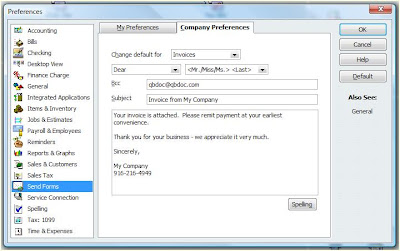
In your Preferences, go to the "send forms" section. Click on "Company Preferences," and then add your email address to the "Bcc" field. This will send a copy of every email you send out of QuickBooks to you, blindly, so that your customers & vendors aren't even aware that you are doing this. You may want to even set up a specific email address that you use only as your virtual "sent" box if you send a high volume of forms from QuickBooks.


As always, we hope this tip has been helpful. If you need more in-depth QuickBooks assistance, don't hesitate to contact our QuickBooks ProAdvisors in Reno at 775-348 9225 or our QuickBooks ProAdvisors in Sacramento at 916-216-4949.

Monday, April 28, 2008

A little more about One-Write Plus


Now that tax time is over (for most people and small businesses), we've started getting an increase in requests to convert old One-Write Plus files into new QuickBooks files. We're always happy to help, as One-Write Plus is no longer supported by Sage Software, and really - it's about time to get out of that truly outdated software and start enjoying the benefits of a modern program with cleaner interfaces, more functionality, better reporting, etc.

In beginning this process, one of the first questions people ask is "What will come across and what won't?"

Well, assuming you have a One-Write Plus for windows file (as One Write Plus DOS files can be a little more challenging), the conversion is pretty straightforward from OWP to Peachtree to QuickBooks. In that process, all of your lists and balances will carry across, as well as historical Profit & Loss and Balance Sheet data. You will be able to see that you had $100 of Telephone Expense in 2007, that you currently owe AT&T $20, what your Sales Income was for January, that "Smith" owes you $100 - But you WON'T have the bill for AT&T or the Invoice for Smith that caused those balances to exist. (This is due to the conversion process summarizing all of that data in month-by-month journal entries).

We appreciate all of the people who have sought us out to help with this conversion process and are happy to answer any questions you might have. Please don't hesitate to call our QuickBooks experts in Reno or Sacramento to assist in your file conversion.

Friday, April 4, 2008

QuickBooks Point of Sale Revolution!


We recently assisted a merchant in Elk Grove in transitioning from an old, manual cash register to a full QuickBooks Point of Sale interface. What a difference this makes for the day-to-day operations of a business!

In the past, they rang up all of their sales on a register, and then entered the transactions manually into QuickBooks Pro at the end of the day - unable to track detail, items sold, inventory quantities, etc. Now they can print barcodes for all of their items, scan those items at the register (reducing the odds of mistakes on prices), record the sales as they happen, print professional looking receipts, track inventory in real time, and transfer all of this information directly to QuickBooks financial at the push of a button!
If your business is looking for QuickBooks Point of Sale help in Sacramento or QuickBooks Point of Sale help in Reno or Tahoe - please let us assist you in moving into the modern era. The difference in productivity, accuracy, and peace of mind that comes from making the jump to POS is the best investment any small business can make today.