
Friday, June 27, 2008

Need a copy of sent emails?

Until the most recent version of QuickBooks, which finally let us integrate the QuickBooks email function with Microsoft Outlook, one of the biggest frustrations of QuickBooks users who use the email function in Quickbooks was that once something was sent it was essentially gone. There was no way to go back to a "sent" folder and take a look at the notes that had been typed in messages to clients or vendors. Sure, you could look up the original invoice, p.o., etc. But you couldn't find the content of your message.

Of course, if you are like some of our clients who don't like using Microsoft Outlook for email - then you still have this frustration as well.

Unless, you use this great tip:

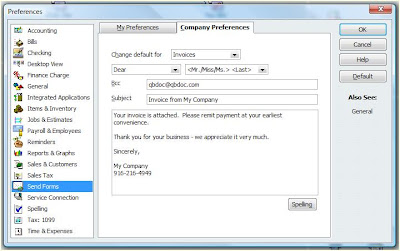
In your Preferences, go to the "send forms" section. Click on "Company Preferences," and then add your email address to the "Bcc" field. This will send a copy of every email you send out of QuickBooks to you, blindly, so that your customers & vendors aren't even aware that you are doing this. You may want to even set up a specific email address that you use only as your virtual "sent" box if you send a high volume of forms from QuickBooks.


As always, we hope this tip has been helpful. If you need more in-depth QuickBooks assistance, don't hesitate to contact our QuickBooks ProAdvisors in Reno at 775-348 9225 or our QuickBooks ProAdvisors in Sacramento at 916-216-4949.

Tuesday, May 27, 2008

Peachtree 2009 is available now!


While we focus much more on QuickBooks than Peachtree here in this blog, it is worth pointing out that the new version of Peachtree has just been released and is now available for purchase. We have only had a few days with it, but so far, the 2009 release is a significant improvement over prior versions of Peachtree.


Below are some of the new feautures Peachtree touts on their website. We look forward to using the product and giving a more thorough reviewe in the weeks to come.


New Features of Peachtree Complete Accounting 2009


Multi-Year Reporting*
Compare budgets and financial results across multiple years within your General Ledger reports and Financial Statements. As your business grows over the years, you will be able to use this functionality to get improved trending analysis, better research, and more accurate forecasts based on prior year activity.


Flexible Payroll Management
Access to a flexible payroll management tool for your business is available. Peachtree 2009 makes managing your payroll easier with set-up improvements and expanded offerings for benefits and deductions. These expanded feature improvements offer you a better way to account for items that you need to effectively manage your business.


Real-Time Error Alerts
Having data accuracy is critical to any small business. Within Peachtree, you will be alerted when using non standard AP and AR accounts upon saving the transaction or when using a non-cash account in the cash account field on receipts and payments.


Cash Flow Management
Easily analyze and forecast your cash flow with the use of the cash flow management tool. You will have the ability to know whether or not you will have enough cash to meet current and upcoming financial obligations by managing your cash flow from one location. Additionally, you will be able to export cash flow forecasts into Microsoft Excel.


Time and Expense Tracking
Peachtree 2009 allows you to locate your time and expense tickets through a quick list view, utilize a new invoice form specific for your industry, as well as customize the first day of your business week depending on how your company tracks time.
Wednesday, May 21, 2008

Final Reminder: Upgrade QuickBooks Now!


Those of you still using QuickBooks 2005 (pro or Premier) or QuickBooks Enterprise Solutions 5.0 AND processing your own payroll. Please, upgrade to the newest version of QuickBooks before May 31st. We have made this point before, but it is incredibly important to do this. If you don't, you will find that when you go to pay your employees in the first week of June, you'll be in trouble.

Please don't hesitate to call us if you need expert assistance in upgrading to the 2008 edition. And don't miss out on the opportunity to save 15-20% on your software by using our webstore. Don't be the person who calls on June 6th and says "my payroll isn't working!" (though, we'll still help even if you are that person).

Wednesday, May 14, 2008

Time to Update Point-of-Sale!


This post is just a quickie to let you know that there is a new update for QuickBooks Point of Sale Version 7. Release 3 includes a number of fixes which anyone running Point of Sale will want right away. Either update fom within Point of Sale, or go to the QuickBooks site and manually download this important update.

Monday, April 28, 2008

A little more about One-Write Plus


Now that tax time is over (for most people and small businesses), we've started getting an increase in requests to convert old One-Write Plus files into new QuickBooks files. We're always happy to help, as One-Write Plus is no longer supported by Sage Software, and really - it's about time to get out of that truly outdated software and start enjoying the benefits of a modern program with cleaner interfaces, more functionality, better reporting, etc.

In beginning this process, one of the first questions people ask is "What will come across and what won't?"

Well, assuming you have a One-Write Plus for windows file (as One Write Plus DOS files can be a little more challenging), the conversion is pretty straightforward from OWP to Peachtree to QuickBooks. In that process, all of your lists and balances will carry across, as well as historical Profit & Loss and Balance Sheet data. You will be able to see that you had $100 of Telephone Expense in 2007, that you currently owe AT&T $20, what your Sales Income was for January, that "Smith" owes you $100 - But you WON'T have the bill for AT&T or the Invoice for Smith that caused those balances to exist. (This is due to the conversion process summarizing all of that data in month-by-month journal entries).

We appreciate all of the people who have sought us out to help with this conversion process and are happy to answer any questions you might have. Please don't hesitate to call our QuickBooks experts in Reno or Sacramento to assist in your file conversion.

Friday, April 18, 2008

We Are Now QuickBooks Retail Solution Providers!

Thanks to the wonderful people at Intuit, and the ongoing support of our growing client base, Custom Business Solutions is now part of the Retail Solution Provider program. This means that we'll be brining our point of sale expertise to more small and medium sized business in Sacramento, Tahoe, the Sierras, and Reno. We will not only be able to provide service, but sell our clients the appropriate hardware and software for their retail point of sale needs.

As always with this blog, we're here to provide tips and help to QuickBooks users as well. A recent development that everyone should be aware of revolves around the release of a Microsoft Update affecting the ".NET" framework. In some cases this can cause QuickBooks to begin to launch - show the "splash screen" and then stop loading. Fortunately Intuit has detailed instructions to fix this problem posted at their website.

Wednesday, April 9, 2008

QuickBooks Program Releases - Updates

With each QuickBooks product, there are occasional maintenance releases or patches as Intuit adds new features or fixes some bugs that have been reported. You can download updates for your QuickBooks products at support.quickbooks.intuit.com/support/productupdates.aspx .

To check which release you currently have installed, start QuickBooks and then press the F2 key on the top row of the keyboard (or press the control key and the number 1 at the same time - CTRL+1). This will show you a great deal of information about QuickBooks and the current file you have open (if you have a file open) - including the release number at the very top of the window:

In the example here, I can see that I'm running QuickBooks 2008 with release 5 (the most current release as of the time of this post).